
Optimizing your Google Business Profile means more than just filling out a few fields. It’s about treating it like a living, breathing part of your business—keeping every section maxed out with accurate info, constantly adding fresh photos and posts, and staying on top of customer reviews and questions. When Google sees this consistent activity, it signals that your business is active and relevant, which is a critical factor for ranking higher in local search and the Google Maps Pack.
Why Your Google Business Profile Is Your Most Powerful Local SEO Tool
Before you start tweaking settings, you need to get one thing straight: your Google Business Profile isn't just another line item in an online directory. It's your digital storefront, your front desk, and your main street billboard, all wrapped into one incredibly powerful—and free—tool. For many potential customers, this profile is their first impression of your business.
A fully fleshed-out profile is the absolute cornerstone of local SEO today. It has a massive impact on how customers see your credibility and, just as importantly, how Google decides to rank you. When someone searches for "plumber near me" or "best coffee shop in downtown," Google’s algorithm is digging through GBP listings to find the most relevant, trustworthy, and active businesses to feature in that coveted "Map Pack" at the top of the page.
Here's a number that should get your attention: a staggering 46% of all Google searches are from people looking for local information. If your GBP isn't dialed in, you're essentially invisible to almost half of the customers actively searching for what you offer.
The First Steps: Claiming and Verifying Your Listing
It all starts with ownership. You can't optimize what you don't control, so the first non-negotiable step is to claim and verify your business listing. This simple process proves to Google that you're the rightful owner, giving you the keys to manage all the information customers see.
Verification usually happens with a postcard mailed to your physical address, but sometimes you can do it via a phone call or email. This is Google's way of weeding out fake listings and making sure the data it serves up is legit. Finishing this step instantly builds a foundation of trust with both Google and your future customers.
This is a critical first move for a few reasons:
- Control Your Information: It lets you fix any wrong business names, addresses, phone numbers (your NAP), or hours.
- Build Authority: A verified profile sends a strong signal to Google that you're a legitimate, operating business.
- Unlock Features: You can't access the good stuff—like responding to reviews, publishing posts, or seeing performance insights—until you're verified.
Without a verified profile, your business is just a ghost in the machine. You're listed, but you're unmanaged and have almost no shot at ranking for valuable local searches. You can see how this fits into the bigger picture in our complete guide to SEO marketing for local businesses. By taking this one action, you set the stage for all the strategies that will turn a basic listing into a lead-generating machine. It’s the first domino that needs to fall.
Building a Foundational Profile That Ranks
Once you’ve claimed and verified your listing, the real work begins. This is where you move beyond just filling in the blanks and start turning a passive profile into a lead-generating machine. Your initial setup is the bedrock that tells Google exactly who you are, what you do, and why local customers should choose you.
Think of it as a three-part process: claiming ownership, verifying you’re a legitimate business, and then building trust by providing complete, accurate, and compelling information.
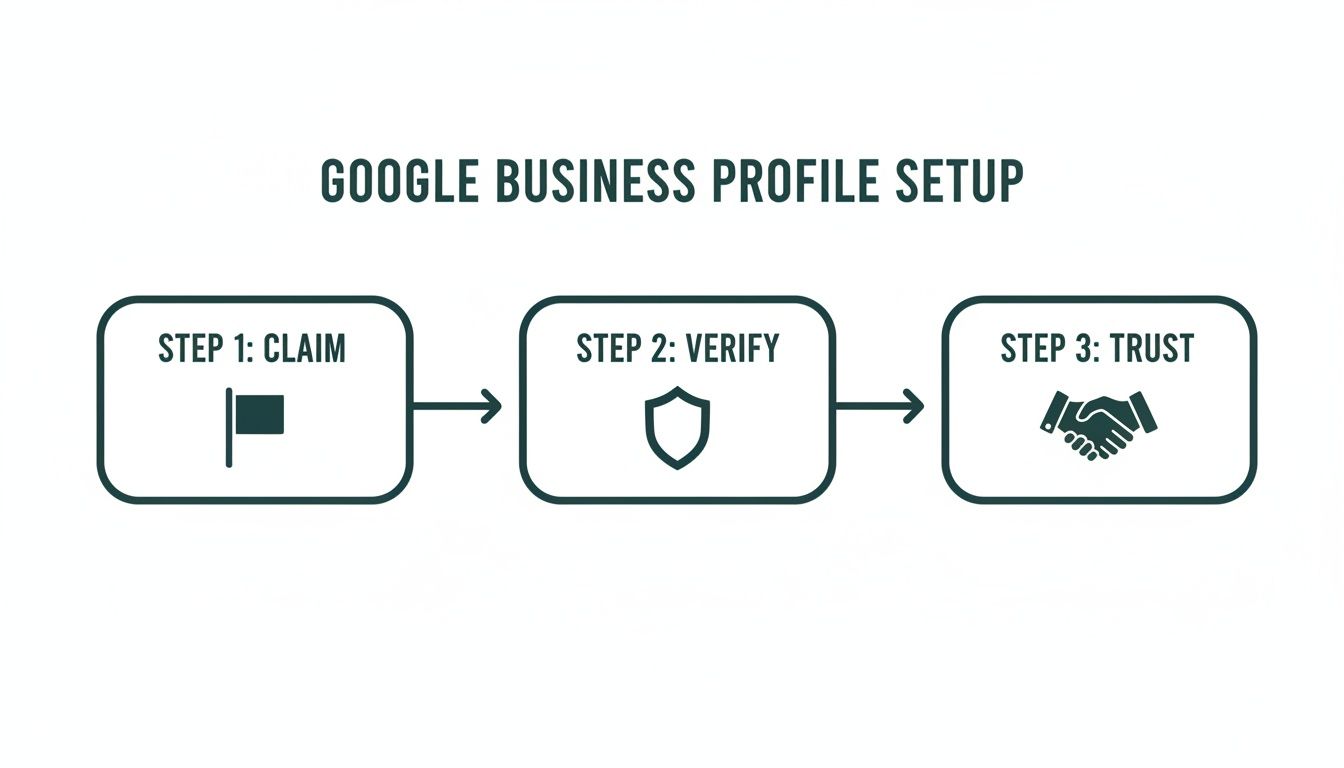
Getting these first steps right is your ticket to showing up in competitive local searches and, hopefully, landing a coveted spot in the Google Map Pack.
Crafting a Compelling Business Description
You have 750 characters to tell your story here—make every single one count. This is your elevator pitch. The first 250 characters are critical because they're what people see before they click to read more. So, lead with what makes you different and the problem you solve for your customers.
Avoid generic fluff. Instead, weave in your top local keywords and use language that speaks directly to your ideal customer. For instance, a San Diego-based web designer could write: "Danny Avila builds conversion-focused websites for ambitious San Diego businesses. We specialize in local SEO and story-driven video to help you get discovered and look exceptional online."
This example immediately tells you the service (websites), the target location (San Diego), and the unique value (local SEO, video, exceptional results). It’s clear, direct, and packed with valuable information.
Choosing Your Business Categories Strategically
If you're going to obsess over one thing, make it your business categories. Seriously. Your primary category is arguably the most powerful local ranking factor there is. It directly tells Google which searches you’re most relevant for.
According to Whitespark’s 2023 Local Search Ranking Factors survey, categories are the number one element for ranking in the Local Pack. The data even shows that businesses using four additional categories achieved the highest average map ranking. You can find more great insights like this from industry pros like the team at Revved Digital.
Your primary category must be your main business offering—what you're truly known for. Then, layer in secondary categories to cover all your other services and specialties.
Pro Tip: Do a little competitive recon. Look up your top-ranking local competitors and see what categories they're using. I often use a browser extension like GMB Everywhere to quickly see their primary and secondary choices. Don't just copy them blindly; use this intel to understand what Google is rewarding in your specific market and align it with your most profitable services.
Before we move on, let's pull all these foundational pieces together. Use this checklist to make sure you've covered all the essential details that form the core of your profile.
GBP Core Information Checklist
| Element | Optimization Tip | Why It Matters |
|---|---|---|
| Business Name | Use your real-world, registered business name. Do not add keywords. | Keyword stuffing your name is against Google's guidelines and can lead to suspension. |
| Primary Category | Select the most specific and accurate category for your main service. | This is the single most important factor for ranking in relevant local searches. |
| Secondary Categories | Add all other relevant categories that describe your other services. | This helps you show up for a wider range of long-tail and specific customer searches. |
| Business Description | Write a compelling, customer-focused pitch. Use all 750 characters. | Your chance to sell your value proposition and include important local keywords naturally. |
| Address | Ensure your address is 100% accurate and matches your physical location. | This is how Google verifies your location and shows you on the map. |
| Phone Number | Use a primary, local phone number that is consistently used elsewhere. | A key part of your NAP, it provides a direct line for customers to contact you. |
| Website | Link directly to your website's homepage or most relevant location page. | Drives traffic and allows customers to learn more about you. |
| Hours of Operation | Keep your hours meticulously updated, including holidays and special events. | Inaccurate hours are a major source of frustration for customers and can lead to bad reviews. |
Completing this checklist thoroughly sets the stage for everything else. It builds a solid, trustworthy foundation that both Google and your future customers can rely on.
Detailing Your Products and Services
So many businesses leave the "Products" and "Services" sections of their profile blank, and it’s a huge missed opportunity. These aren't just filler—they turn your profile into a virtual storefront or service menu.
- For Services: Don't just list "Marketing." Break it down. List out "Local SEO," "Google Ads Management," and "Brand Video Production." Add descriptions for each to explain the value.
- For Products: This is your chance to shine. Upload high-quality photos for every product. Write unique descriptions that include relevant keywords, just as you would for an e-commerce store. You can even add pricing and a link to buy.
This level of detail does more than just inform customers. It feeds Google a rich, structured set of data about your business, helping it match you to much more specific, long-tail search queries.
Key Takeaway: A fully built-out Products and Services section acts as a powerful sales tool right on your profile. It answers customer questions up front and helps qualify leads before they even pick up the phone, which saves everyone a ton of time.
Ensuring Absolute NAP Consistency
Finally, let's talk about a non-negotiable rule of local SEO: NAP (Name, Address, Phone Number) consistency. Your core business information must be identical everywhere it appears online—on your website, your Google profile, and any other directory or citation you're listed on.
Even tiny inconsistencies can cause confusion for search engines and customers alike. Using "St." on one profile and "Street" on another might seem trivial, but it can dilute your local search authority. Do a quick audit of your online presence and make sure your information is perfectly uniform.
This foundational accuracy is a massive trust signal to Google, cementing your business's identity and proving you are who you say you are, where you say you are.
Using Visuals and Reviews to Build Customer Trust
Let's be honest, a Google Business Profile that's just a wall of text feels… empty. It doesn't inspire confidence. If you want to turn your profile from a simple listing into a magnet for new customers, you need to bring it to life with compelling photos, videos, and authentic customer feedback. This is how you build instant credibility.
Think of your profile’s visuals as your digital handshake. They're the first thing people see, and they have the power to stop someone from scrolling and actually pay attention. This isn't just about making things look nice; it’s a fundamental part of building trust before a customer ever steps through your door.
The data backs this up. Profiles with photos are seen as 2.7 times more trustworthy than those without. I’ve seen it time and again: the businesses that consistently show up in the top Local Pack results almost always have a richer, more extensive collection of images than their competitors. The team at Search Endurance has some great data on this if you want to dig deeper.
A Strategic Approach to Profile Visuals
Throwing up a few generic stock photos won't move the needle. You need a thoughtful visual strategy that showcases the real heart of your business. The goal is to visually answer your customers' questions before they even think to ask them.
So, what should you be adding?
- Exterior and Interior Shots: Show people what your business looks like from the street and what they can expect inside. This simple step removes a huge barrier of uncertainty and makes them more likely to visit.
- Team Photos: It’s a classic for a reason. Putting a friendly face to your brand instantly humanizes your business and starts building a real connection.
- Behind-the-Scenes Content: Give people a peek behind the curtain. A chef in the kitchen, a designer sketching at a whiteboard, or a technician working on a project—these shots build transparency and showcase your team's expertise.
- Products and Services in Action: Don't just show a product on a shelf; show a happy customer using it. For a service, capture the process or the fantastic end result.
- Video Content: A punchy, 30-second video can do more than a dozen photos. Think about a quick tour of your space, a glowing client testimonial, or a simple "hello" from the owner. It adds a dynamic layer that static images just can't match.
Don't underestimate the power of video. A short, well-made clip can communicate personality and value more effectively than anything else. We actually dive into this in our guide on the role of visuals in marketing videos.
Mastering Your Review Management Strategy
While great visuals catch the eye, it's your reviews that seal the deal. Your online reputation is built on the words of your past customers. A proactive plan for managing reviews is one of the most critical parts of optimizing your Google Business Profile.
You're really aiming for two things here: consistently getting new, positive reviews and professionally handling all feedback, even the tough stuff. Google pays close attention to both the quantity and quality of your reviews; it's a huge local ranking signal.
How to Proactively Generate Positive Reviews
You can't just sit back and hope for reviews to trickle in. That's a slow, unreliable path. Instead, you need a simple system to encourage feedback from your happiest customers.
- Time Your Ask Perfectly: The absolute best time to ask for a review is right after a great experience—when a project wraps up successfully or a customer gives you a glowing compliment in person.
- Make It Insanely Easy: Don't just say, "Leave us a review!" That creates work for them. Grab the direct review link from your GBP dashboard and send it straight to them in an email or text. It removes all the friction.
- Personalize the Request: A generic, automated email is easy to ignore. A personal note from you or the team member who helped the customer feels genuine and dramatically increases your chances of getting a response.
Responding to Every Review Professionally
Responding to your reviews is simply non-negotiable. It shows you're engaged and that you care about what your customers have to say. This is never more important than when you're dealing with negative feedback.
When a negative review comes in:
- Be Quick: Try to reply within 24-48 hours. A fast response shows you're on top of things.
- Acknowledge and Empathize: Start by validating their feelings. A simple, "I'm so sorry you had a frustrating experience with us" can de-escalate the situation immediately.
- Take It Offline: Your goal isn't to win an argument online. Offer to make it right by providing a direct phone number or email. This shows everyone else reading the reviews that you're committed to customer satisfaction.
By weaving together a strong visual strategy with diligent review management, you create a profile that doesn't just rank higher—it actively converts browsers into believers and, ultimately, into loyal customers.
Your Google Business Profile shouldn't just be a static listing—it needs to be a living, breathing part of your online presence. If you're not actively using its interactive features, you're essentially invisible. The real magic happens when you start sending constant signals to Google that your business is active, engaged, and a top choice for local customers.
This is how you turn a simple directory entry into a dynamic channel for customer communication.

Think of features like Posts, Q&A, and Messaging as your direct line to both potential customers and Google's algorithm. Every time you use them, you're proving your business is open, operational, and ready to help.
Drive Engagement with Google Posts
Google Posts are one of the most powerful—and most overlooked—tools in your GBP toolkit. They're essentially mini-updates that show up right on your profile, giving you a chance to share what's new and relevant. Ignoring this feature is a huge missed opportunity.
Posts let you share timely updates, showcase special offers, and announce events. The key here is consistency. I always tell my clients to publish a new post at least once a week. This regular activity is a powerful signal to Google that your profile is fresh and actively managed.
You have a few different types of posts to work with:
- Updates: These are perfect for sharing recent blog articles, company news, or showing off a new project. A San Diego video production company, for example, might post a behind-the-scenes photo with the title, "Just Wrapped a New Brand Story Video for a Local Cafe!"
- Offers: Built for time-sensitive promotions. They have a start and end date, making them perfect for sales or deals like, "Get 15% Off Your First SEO Audit This Month Only."
- Events: Use these to promote anything from a webinar to an in-store workshop. You can add a title, date, time, and a direct link to your registration page.
A critical mistake I see all the time is treating Posts like a sales billboard. Don't do that. Instead, focus on providing value. Share useful tips, answer common questions, or tell a quick customer story. Your goal is to create content that stops the scroll and gets someone to click.
Control the Narrative with Q&A
The Questions & Answers section on your profile is a public forum. Anyone can ask a question, and literally anyone can answer it. This can be a blessing or a curse. Left unmanaged, it can easily become a hotbed of misinformation.
But you can take control. The smartest move is to proactively seed this section with your own frequently asked questions. This is one of my favorite optimization hacks because it lets you address common sales objections and provide valuable information right off the bat.
Here’s how you do it:
- Log out of your business account or open an incognito window. Find your business and ask a question just like a regular customer would.
- Then, log back into your business account and provide a detailed, keyword-rich answer as the business owner.
Brainstorm the top 5-10 questions you always get from new clients. For a web design agency, this could be, "How long does it take to build a new website?" or "Do you offer ongoing website maintenance?" By answering these yourself, you build a valuable resource that saves you time and shapes how potential customers see your business.
Turn on Direct Leads with Messaging
The messaging feature transforms your profile into a direct line for customer inquiries, making it a powerful lead-generation tool. When someone finds your profile, they can simply tap a button and send you a message.
Enabling messaging sends a strong signal that you're accessible and ready to talk. But it comes with a responsibility: you have to respond quickly. Google actually tracks your average response time and displays it on your profile. A slow response can absolutely deter future customers.
A great first step is to set up an automated welcome message to acknowledge inquiries instantly. Something simple like, "Thanks for reaching out to Danny Avila! We've received your message and will get back to you within a few business hours," manages expectations and shows you're on top of things. It keeps both your customers and Google happy.
How to Measure Your GBP Performance and Stay Ahead
Getting your Google Business Profile optimized is a huge first step, but it's not a one-and-done job. The real magic happens when you start treating it like the dynamic, data-driven tool it is. This means getting comfortable with your GBP Insights and using them to understand exactly how people are finding you—and what they're doing once they do.
Think of Insights as the control panel for your local search performance. Without it, you’re just guessing. You might be putting in a lot of effort, but you won't know if it's actually paying off. Diving into this data is the only way to steer your strategy in the right direction.
Making Sense of Your GBP Insights
When you pop open your performance report, it's easy to feel a bit overwhelmed by all the charts and numbers. The key is to cut through the noise and focus on what the data is telling you about real customer behavior. These metrics tell a story about who's seeing your profile and how they're engaging with it.
Instead of trying to track everything, start with the metrics that truly matter:
- Search Queries: This is a goldmine. It shows you the exact words and phrases people typed into Google to find you. Are they looking for "plumber near me" or a specific service you offer? This tells you if your keywords are hitting the mark.
- Profile Interactions: This is your engagement score. It lumps together all the meaningful actions people take, like calling your business, clicking to your website, or asking for directions. It’s a direct measurement of how compelling your profile is.
- How Customers View Your Business: This chart breaks down whether people found your listing through a standard Google Search or by browsing Google Maps. It’s great for understanding where your visibility is strongest.
It's tempting to get excited about big numbers like photo views, but don't get distracted. The real money is in the high-intent actions: calls, website clicks, and direction requests. These are the clicks that signal someone is ready to become a customer.
The potential impact here is huge. On average, a well-managed GBP can pull in 1,250 views every month. Of those, an impressive 56% will click through to the business's website. That's nearly 700 potential customers landing on your site from this one free tool alone.
Creating a Sustainable Maintenance Routine
Google loves seeing activity. An updated, active profile sends a strong signal that your business is open, engaged, and relevant to searchers. To keep that momentum going, you need a simple maintenance routine you can stick with.
This doesn't need to eat up your week. A focused monthly check-in is all it takes to keep your profile in top shape and ahead of the competition.
Here’s a practical checklist I give my own clients for their monthly GBP tune-up:
- Publish One New Google Post: Share an update, a special offer, or a helpful tip. This keeps your profile looking fresh.
- Add New Photos or a Video: Upload a picture of a recent project, a new team member, or even a quick 30-second video tour. Visuals grab attention.
- Respond to All New Reviews: Make a point to thank every positive reviewer. For negative feedback, respond professionally and try to take the conversation offline.
- Answer a New Q&A: Don't wait for people to ask. Proactively add a common question and answer it yourself. It's a great way to provide helpful info upfront.
- Audit Your Core Info: Take 60 seconds to triple-check your hours, phone number, and address. This is critical for ensuring 100% accuracy, especially before a holiday.
To really dig into what the numbers mean, it helps to break down the key performance indicators (KPIs) available in your GBP dashboard.
Key GBP Metrics and Their Meaning
This table breaks down the most important metrics from your GBP Insights, explaining what they actually measure and what you should do with that information.
| Metric | What It Measures | Actionable Insight |
|---|---|---|
| Search Queries | The keywords customers use to find your business. | If queries are irrelevant, adjust your business description and services. If relevant, create Google Posts targeting those terms. |
| Direct Searches | Users who searched for your business name or address directly. | This indicates brand awareness. High numbers mean your brand is well-known in the area. |
| Discovery Searches | Users who found you by searching for a category, product, or service. | This is your opportunity for growth. Low numbers mean you need to improve your category and service optimization. |
| Website Clicks | The number of people who clicked the website link on your profile. | This is a key conversion metric. If clicks are low, make sure your call-to-action is clear in your posts and description. |
| Direction Requests | Users who clicked the "Directions" button to get navigation to your location. | A strong indicator of foot traffic. If you're a brick-and-mortar, this is one of your most important metrics. |
| Calls | The number of clicks on your phone number from your profile. | A direct lead generation metric. Track this to measure how many immediate inquiries your profile is driving. |
By regularly reviewing these metrics, you can make smarter decisions about where to focus your efforts.
This simple routine shifts your GBP from a static directory listing into a powerful, ongoing strategy for growth. By paying close attention to your data and keeping your profile fresh, you’ll build a reliable engine for attracting local customers month after month. For more ways to improve your search performance, check out this guide on the top free SEO tools for boosting search rankings.
Your GBP Optimization Questions, Answered
Even with the best playbook, you're bound to run into some specific questions when you're in the weeds optimizing your Google Business Profile. Getting these details right is often what separates a decent profile from one that’s a real customer magnet. Here are some of the most common questions I hear from business owners, along with straightforward, no-fluff answers.
How Often Should I Be Creating Google Posts?
Consistency is your best friend here. At a minimum, you should aim to publish a new Google Post at least once every 7-10 days. Think of it as a heartbeat for your profile—it signals to Google that you’re active, open, and have something to say.
Now, if you’re running promotions, have a lot of events, or just have a lot of great content to share, don't be shy. Bumping that up to 2-3 times per week can seriously boost engagement. The trick is to vary what you're posting.
- Run a weekend sale? Use an 'Offer' post with a clear expiration date.
- Just published a new blog or have a great behind-the-scenes photo? That's perfect for an 'Update' post.
- Hosting a webinar or an in-store tasting? The 'Event' post type is made for that.
Mixing it up keeps your profile fresh and gives people more reasons to click through.
What's the Single Most Important Factor for Ranking in the Local Pack?
If you only get one thing right, make it this: your primary business category. This is, without a doubt, the most powerful signal you can send Google about who you are and what you do. It directly tells the algorithm which searches you should show up for.
Choosing the wrong primary category is like trying to sell pizza in a town that thinks you're a hardware store. You'll be invisible to your most valuable customers.
Once you’ve locked that in, the next most crucial pieces of the puzzle are:
- Rock-solid NAP (Name, Address, Phone) consistency everywhere online. No variations, period.
- A steady stream of new, positive reviews from your actual customers.
- A 100% complete profile, packed with high-quality photos and detailed service descriptions.
Get the category right first. Then, build your foundation with the other elements.
What’s the Best Way to Handle a Bad Review?
Seeing a one-star review pop up can sting, I get it. But how you respond publicly is a massive opportunity to show everyone else how much you care. The key is to be quick and professional—try to respond within 24-48 hours.
First off, never ignore it. A simple acknowledgment of their bad experience can defuse the situation immediately. Don't get defensive.
Here’s a great template: "Thank you for sharing your feedback. We're genuinely sorry to hear your experience didn't live up to our standards. We want to make this right. Could you please call our manager, Sarah, at [phone number] so we can understand what happened and find a solution?"
This shows anyone reading the reviews (and that’s a lot of people) that you take feedback seriously and are committed to customer satisfaction. It turns a potential negative into a public display of great service.
Can I Add Keywords to My Business Name on Google?
Let me be crystal clear: absolutely not. This is one of the fastest ways to get your profile suspended, and trust me, getting it back is a nightmare.
Your business name on your Google Business Profile must be an exact match for your real-world business name. That means what’s on your business license and the sign on your front door.
Adding extra words like "Danny's Web Design – Best SEO in San Diego" is known as keyword stuffing, and it's a direct violation of Google's guidelines. They crack down hard on this.
The right way to work in your keywords is to weave them naturally into places where they belong:
- Your business description
- Your service and product lists
- Your Google Posts
- Your answers to the Q&A section
Play by the rules. It’s the only way to build a sustainable presence that wins in the long run.
Ready to turn your Google Business Profile into a powerful, lead-generating machine without all the guesswork? The team at Danny Avila specializes in creating and managing fully optimized profiles that drive real, measurable growth for businesses in San Diego and beyond. We combine deep local SEO expertise with a data-driven strategy to get you in front of the right customers, right when they're looking.
Start Dominating Local Search with a Free Consultation
Article created using Outrank