
Think of marketing automation workflows as a way to have personalized conversations with every customer, but at scale. They're basically a series of actions—like sending a perfectly timed email or adding a note to a customer's profile—that kick off automatically when someone does something specific, like downloading a guide or checking out your pricing page.
The real magic here is that every single lead gets a timely, relevant follow-up, and you don't have to lift a finger.
Why Your Business Needs Automated Workflows
Let's be real—you can't be everywhere at once. A marketing automation workflow is like having a super-efficient digital assistant who works 24/7 to handle your repetitive tasks. It's a system that sends the right message at just the right moment, making sure no lead ever slips through the cracks. This isn't about being robotic; it's about using technology to free up your time so you can focus on strategy and building genuine relationships.
At their heart, these workflows run on simple "if this, then that" logic. If a customer abandons their shopping cart, then send a friendly reminder an hour later. If a new prospect fills out your contact form, then add them to your CRM and fire off a welcome email.
The Building Blocks of a Workflow
No matter how complex they seem, every workflow is made from three simple parts:
- Triggers: This is the event that kicks the whole thing off. It could be someone clicking a link, visiting a specific page, or not opening your last three emails.
- Actions: These are the "then that" part—the actual tasks your system carries out. Think sending an email, adding a tag to a contact, or even pinging your sales team on Slack.
- Delays: This is just a waiting period. Putting a delay between actions is crucial for making your communication feel natural, not like it’s coming from a machine.
When you start combining these three elements, you can create a guided journey for your customers. An e-commerce brand can automatically send product recommendations after a purchase. A local plumber can set up a workflow that follows up on a quote, sends a service reminder, and asks for a review a week later. It’s this kind of consistent follow-through that builds lasting relationships, blending the best of digital marketing vs traditional marketing.
The bottom line: Automation is all about delivering the right message to the right person at precisely the right time. By setting up these touchpoints, you build a reliable engine for nurturing leads and keeping customers happy.
The numbers don't lie. Even though automated emails make up just 2% of all emails sent, they drive a whopping 41% of all email-driven orders. That single stat shows just how powerful a well-thought-out workflow can be. You can dig deeper into these powerful automated email statistics.
To give you a better idea of what's possible, here are some of the most common and effective workflows I see businesses implement.
Essential Marketing Automation Workflow Types
This table breaks down the most impactful automation workflows we see small and mid-sized businesses using to drive real growth.
| Workflow Type | Primary Goal | Best For |
|---|---|---|
| Welcome Series | Nurture new subscribers and build an initial relationship. | Onboarding new email list sign-ups or customers. |
| Lead Nurturing | Educate and build trust with leads who aren't ready to buy. | Following up on content downloads (e.g., ebooks, webinars). |
| Abandoned Cart | Recover lost sales by reminding shoppers what they left behind. | E-commerce sites and online course platforms. |
| Post-Purchase | Increase customer lifetime value and gather feedback. | Following up after a sale with upsells, review requests, or tips. |
| Re-engagement | Win back inactive subscribers or customers. | Targeting contacts who haven't opened emails or purchased recently. |
| Event/Webinar | Drive registrations and ensure attendance. | Promoting and managing live or virtual events. |
Each of these serves a different purpose, but they all work toward the same goal: creating a better, more consistent customer experience that grows your business.
Map Your Customer Journey Before You Build
It's tempting to jump right into your new marketing automation software and start building. But that's one of the most common mistakes I see people make. It’s like trying to build a house without a blueprint—you might get four walls and a roof, but it’s not going to be the home your customer actually wants to live in.
The most powerful marketing automation workflows don't just happen. They're carefully designed around a deep understanding of what your customer goes through, from the very first time they hear about you to long after they’ve made a purchase. Before you drag and drop a single trigger or action, you need to map that journey. This is the only way to make your automation feel genuinely helpful instead of robotic and annoying.
From First Glance to Raving Fan
The path a customer takes is rarely a straight line. It's more of a winding road with key milestones along the way. Your job is to pinpoint those milestones and get inside your customer's head to figure out what they're thinking, feeling, and needing at each stop.
A simple framework I always come back to is breaking the journey into distinct phases. Just ask yourself what questions your customers have at each point:
- Awareness: How do people even find you? What’s the initial problem they’re trying to solve that leads them to your doorstep?
- Consideration: Now that they know you exist, what do they need to see to trust you? This is where they hunt for reviews, compare you to the competition, and look for proof you can solve their problem.
- Decision: What's the final nudge they need to pull the trigger? It could be a limited-time offer, a reassuring testimonial, or a simple, well-timed follow-up.
- Retention: The sale is done. Now what? This is your chance to make them feel like a valued part of your business through great onboarding, proactive support, and useful content.
- Advocacy: How do you transform a satisfied customer into someone who actively promotes your business? Think review requests, referral programs, and loyalty perks.
Answering these questions gives you a treasure map of opportunities. For example, if you know customers in the consideration stage are digging for case studies, you've just identified the perfect piece of content to automate in a lead nurturing sequence.
A Real-World Journey Map in Action
Let's make this concrete. Imagine you run a local HVAC company in a hot place like San Diego. What does a typical customer journey look like?
- Awareness: It's the middle of a heatwave, and a homeowner's AC dies. Their first move is a frantic Google search for "emergency AC repair near me," and your website pops up.
- Consideration: They land on your site, quickly scan your services, and—most importantly—read a few glowing reviews on your testimonials page. They see a big, clear "Request a Quote" button and click it.
- Decision: They fill out the form. An instant automated email hits their inbox confirming you got their request and promising a call within the hour. That immediate, professional response builds instant trust.
- Retention: A week after a successful repair, an automated email goes out. It asks for a review and offers a small discount on a future maintenance plan. It’s helpful, not pushy.
- Advocacy: Six months later, another automated email reminds them it's time for a seasonal tune-up. This keeps your business top-of-mind and reinforces your role as their go-to expert.
See how this entire sequence is built around the customer's immediate needs? The automation isn't just sending random messages; it's delivering timely, relevant information and support right when it matters most.
This planning stage is absolutely non-negotiable. Grab a whiteboard, open a spreadsheet, or just use a notebook. For each stage, jot down the customer's actions, their likely questions, and the perfect message or piece of content to address them.
This map is the strategic foundation for all your marketing automation workflows. Without it, you’re just automating tasks. With it, you’re automating results.
Building Your First High-Impact Workflows
Alright, you've mapped out your customer's journey. Now comes the fun part: turning that map into a set of automated actions that actually grow your business. This is where we stop strategizing and start building the essential marketing automation workflows that will give you the biggest bang for your buck, right out of the gate.
I'm going to walk you through three specific sequences that I've seen deliver the best and fastest results for small and mid-sized businesses. Think of these as your core engine—they handle the heavy lifting at critical points, from the first "hello" to winning back a sale you nearly lost.
This diagram shows the classic journey your customers take. Your workflows are what will guide them from one stage to the next.
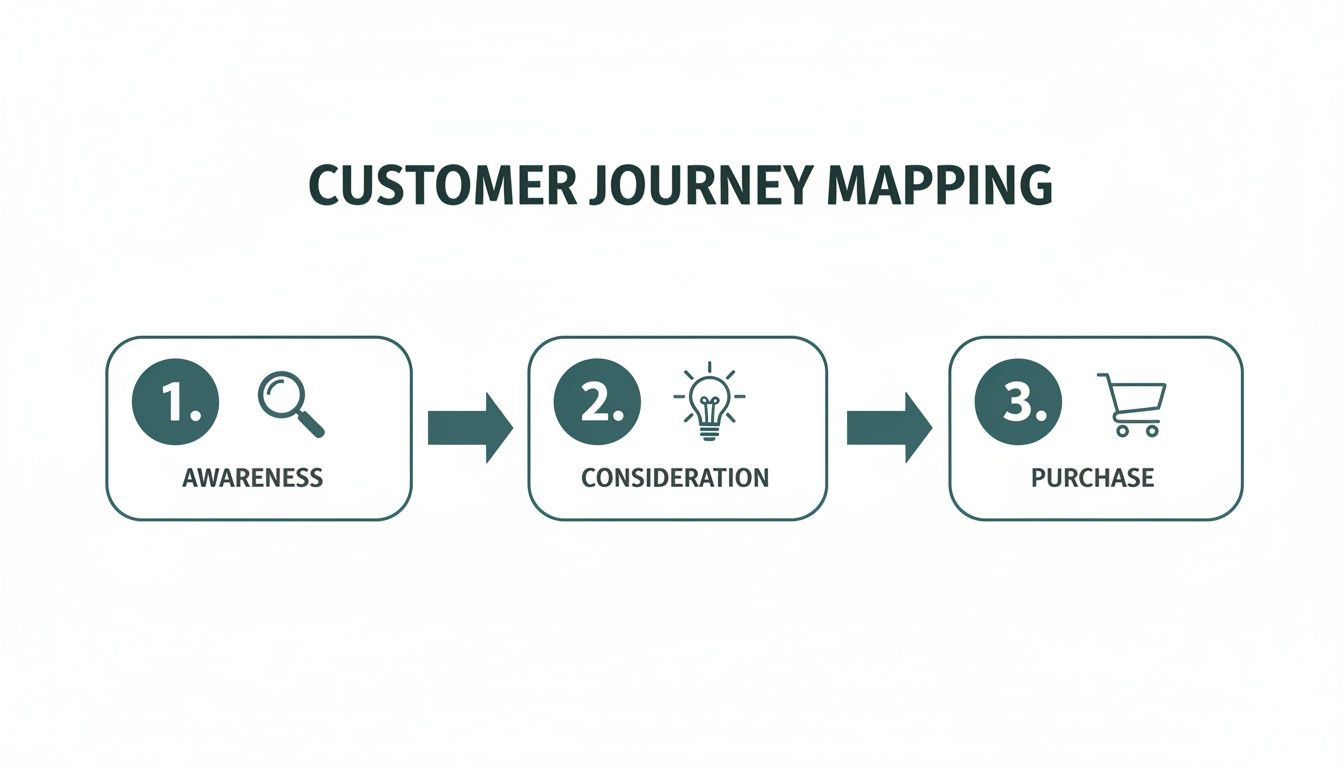
Each of the automations we build will nudge people along this path, moving them from just hearing about you to becoming a paying customer.
The Welcome and Nurture Workflow
First impressions are everything, right? Your welcome sequence is your single best opportunity to make a great one. The moment someone hands over their email address, they're at their most engaged. This workflow is all about seizing that moment.
The goal here is much bigger than a simple "thanks for subscribing." You're introducing your brand's personality, delivering immediate value, and starting the process of guiding them toward their first purchase. For non-profits, this is especially vital, a topic we explore more in our guide on how to use email marketing in non-profit campaigns.
Here’s a simple but incredibly effective sequence:
- Trigger: A user signs up for your email list.
- Action 1 (Immediately): Send the welcome email. This should confirm their subscription, deliver whatever you promised (like a discount code or PDF guide), and give them a quick snapshot of who you are and what you stand for.
- Delay: Wait 2 days.
- Action 2: Send something genuinely useful. Share your most popular blog post, a how-to video, or a case study that addresses a common pain point. You're teaching, not selling.
- Delay: Wait 3 days.
- Action 3: Send some social proof. Hit them with a powerful customer testimonial or shine a spotlight on a popular product with glowing reviews. This is all about building trust.
This flow gently warms up new contacts without coming on too strong, setting the stage for a healthy long-term relationship.
The Abandoned Cart Recovery Workflow
If you run an e-commerce store, people abandoning their carts is just part of the game. But it’s also your single biggest opportunity for a quick win. A smart abandoned cart sequence is almost always the highest-ROI automation you can build. It literally recovers lost money.
The biggest mistake I see is businesses sending just one "you forgot something" email. A truly effective sequence is a multi-step campaign that addresses different reasons for bailing, from a simple distraction to second thoughts about the price.
Try this proven three-part workflow:
| Step | Timing | Content Focus |
|---|---|---|
| Email 1 | 1 Hour After Abandonment | This is a gentle nudge. The tone is helpful—"Did something go wrong?"—not pushy. Include a picture of the item(s) and a big, clear button that takes them right back to their cart. |
| Email 2 | 24 Hours After Abandonment | Time to introduce a little urgency and social proof. Mention the item is a bestseller or that stock is running low. Drop in a great customer review for the exact product they left behind. |
| Email 3 | 48-72 Hours After Abandonment | This is the final push, sweetened with an incentive. Offer a small discount like 10% off or free shipping to get them over the finish line. Stress that the offer is for a limited time. |
This tiered approach gives you the best shot at recovery without being annoying. The first email catches the distracted shoppers, while the later ones win over the hesitant ones.
The Lead Follow-Up Workflow for Service Businesses
For local service businesses—plumbers, lawyers, consultants, you name it—speed is the secret weapon. More often than not, the first person to respond gets the job. This workflow ensures you are always first. It automates that crucial initial follow-up so every single lead gets an immediate, professional reply.
The results are staggering. Companies that automate their lead management see a 451% increase in qualified leads. And it's not just about quantity; automation drives a 77% increase in conversion rates, completely changing the game for a sales team. In fact, 80% of automation users report generating more leads overall.
Here’s a blueprint you can steal for your service business:
- Trigger: Someone fills out your "Request a Quote" or "Contact Us" form.
- Action 1 (Immediately): An auto-response email goes out. It confirms you got their message, tells them when to expect a personal reply (e.g., "within 2 business hours"), and points them to helpful resources on your site.
- Action 2 (Immediately): An internal notification is created. At the exact same time, an alert with the lead's info is sent to your sales team via email or a tool like Slack.
- Delay: Wait 3 days.
- Condition: The system checks if the lead's status has been updated in your CRM (for example, to "Contacted").
- Action 3 (If no change): A gentle follow-up email is sent. Something as simple as, "Just wanted to make sure you got the information you needed," can be enough to restart a stalled conversation.
This system does two critical things at once: it makes the potential customer feel heard and valued instantly, and it creates an internal process that ensures no lead ever falls through the cracks.
Taking Your Workflows to the Next Level with Advanced Tactics
Alright, so you’ve got your foundational workflows up and running. A welcome series is greeting new subscribers, and an abandoned cart sequence is saving sales. That’s a huge win.
But now it's time to shift from just doing the work to making the work smarter. We're moving beyond basic "if this, then that" logic and layering in some intelligence. This is where you turn good automation into a powerful engine that pinpoints your best leads and delivers hyper-relevant messages.
Pinpoint Your Hottest Leads with Scoring
Let's be honest: not all leads are created equal. Someone who grabbed a free checklist from your blog is in a completely different headspace than someone who visited your pricing page three times this week. Lead scoring is how you automatically tell them apart.
Think of it as a point system for engagement. You assign a specific point value to different actions and attributes. When a contact hits a certain threshold—say, 100 points—the system flags them as a "Marketing Qualified Lead" (MQL). From there, you can have an automation that instantly notifies your sales team.
This simple system is a game-changer. It stops your team from wasting time on lukewarm prospects and lets them focus entirely on people who are ready to talk.
Lead Scoring Model Example for a Local Service Business
To make this tangible, here’s a simple scoring model I'd build for a local contractor, like an electrician or plumber. It shows how you can weigh different actions to surface the hottest leads.
| Action/Attribute | Points Awarded | Reasoning |
|---|---|---|
| Visited Pricing Page | +20 | This is a strong signal of buying intent. |
| Filled Out "Request a Quote" Form | +50 | The single highest-intent action a prospect can take. This is a hand-raiser. |
| Opened 3+ Emails in 30 Days | +15 | Shows they're consistently engaged with your content and brand. |
| Visited "Case Studies" Page | +10 | They're doing their due diligence and want proof you can do the job. |
| Job Title is "Office Manager" | +15 | This is a key decision-maker for your more lucrative commercial clients. |
| Unsubscribed from Emails | -100 | Instantly disqualifies them. No point in chasing someone who has opted out. |
A scoring system like this transforms your contact list from a flat directory into a prioritized, actionable pipeline.
Send Smarter Messages with Segmentation
Segmentation is simply the art of breaking your audience into smaller, more focused groups. It’s the engine that powers true personalization. Instead of blasting the same generic message to everyone, you can craft emails that speak directly to a person's known interests, past purchases, or where they are in their buying journey.
The easiest way to do this inside your marketing automation workflows is with tags. A tag is just a label you automatically apply to a contact when they do something specific.
- Someone clicks a link about "WordPress Web Design" in your newsletter? Tag them "Interest: Web Design."
- A client buys your top-tier video production package? Tag them "Customer: Premium Video."
- A prospect attends your webinar on local SEO? Tag them "Attended: SEO Webinar."
Once those tags are in place, the possibilities are endless. You can build workflows that only trigger for people with certain labels. Send a follow-up email with web design case studies only to the people tagged with that interest. Or, offer an exclusive deal on social media management only to your existing "Customer: Premium Video" clients.
The goal is to make every single person feel like you’re talking directly to them. When your content aligns with what a person has already told you they're interested in, your engagement rates—and your sales—will climb. It's that simple.
Continuously Improve with A/B Testing
Your workflows should never be "set it and forget it." There’s always room to improve, and A/B testing (or split testing) is how you find it. The process is straightforward: create two versions of an email within your workflow—Version A and Version B—to see which one performs better.
You can test almost anything:
- Subject Lines: Try a direct, benefit-driven subject line versus one that sparks curiosity with a question.
- Call-to-Action (CTA): Test "Get a Free Quote" against "Schedule Your Consultation." Or even just test a green button vs. a red one.
- Email Content: Does a short, punchy email get more clicks than a longer, more detailed one? Only one way to find out.
- Send Times: Will an email sent at 9 AM on Tuesday beat one sent at 7 PM on Thursday? Your audience will tell you.
Most marketing automation platforms like ActiveCampaign or HubSpot make this incredibly easy. You can set the workflow to send each version to a small slice of your audience (like 10% each). After a day or two, the system automatically sends the winning version to the remaining 80%.
This data-driven approach takes all the guesswork out of optimization and ensures your marketing automation workflows get better and better over time. With 51% of marketers already using AI-powered automation, the push toward more intelligent, self-optimizing workflows is only getting stronger. You can discover more insights about marketing automation trends here.
Measuring Success and Integrating Your Tech
Building slick marketing automation workflows is one thing. Proving they actually work for your business is another game entirely. If you can’t connect your automated sequences to real results, you’re essentially just sending messages into the void.
This is where the rubber meets the road. We need to talk about measurement and integration—the two things that transform your workflows from a neat checklist of tasks into a powerful, predictable growth engine.
Your automation platform can't live on an island. For it to truly shine, it has to communicate with all the other tools you rely on daily, from your CRM to your website to your ad accounts. When everything is connected, data flows freely, and every workflow you build gets smarter and more effective. It's time to move past vanity metrics and focus on what actually drives your bottom line.
Pinpointing the KPIs That Actually Matter
It’s incredibly easy to drown in data. Sure, email open rates and click-throughs are nice to know, but they don't pay the bills. To truly understand the impact of your automation, you have to tie your efforts directly to tangible business outcomes.
Here are the key performance indicators (KPIs) you should obsess over:
- Workflow Conversion Rate: This is the big one. Of all the people who enter a specific workflow, what percentage actually completes the goal? For an abandoned cart sequence, that goal is a finished purchase. For a lead nurturing flow, it might be someone booking a demo.
- Revenue Attribution: Can you put a dollar amount on a workflow? Most marketing platforms can track when a contact in a sequence makes a purchase, directly linking that revenue back to your automated campaign.
- Sales Cycle Length: Are your workflows actually speeding things up? By tracking the time it takes for a new lead to become a paying customer, you can see if your nurturing sequences are effectively shortening that journey.
- Lead-to-Customer Conversion Rate: Look at the bigger picture. Of all the leads that pass through your nurturing funnels, how many eventually become customers? This KPI is a great indicator of your follow-up process's overall health.
When you can confidently report, "Our welcome series brought in $5,000 in new sales last month," you’ve proven the value of your work in a way no one can argue with. For a closer look at tracking what counts, these non-profit marketing tools to measure your campaign's success have principles that apply to any business.
Creating a Seamless Tech Stack
Think of your automation platform as the quarterback of your marketing team—it calls the plays, but it needs the rest of the team to execute. Integrating it with your other software isn't just a nice-to-have; it's essential for getting a single, unified view of your customer.
When your systems are walled off from each other, you create data silos. That's a recipe for clunky, impersonal marketing that misses the mark.
A disconnected tech stack is the enemy of good automation. When your website, CRM, and email platform are all in sync, you can trigger workflows based on a complete picture of customer behavior, not just isolated actions.
Imagine a salesperson updates a lead's status to "Qualified" in your CRM. In a connected system, that one action can automatically trigger a workflow in your marketing platform that sends them a perfectly timed case study. That kind of seamless handoff is marketing gold, and it’s only possible with proper integration.
Here are the most critical connections you need to make:
| Integration Type | Why It's Important | Example in Action |
|---|---|---|
| CRM (e.g., HubSpot, Salesforce) | It creates a two-way data highway. Sales activity informs marketing campaigns, and marketing engagement gives sales valuable context. | A sales rep logs a call in the CRM, which automatically enrolls that contact into a targeted follow-up email sequence. |
| Website & E-commerce (e.g., WordPress, Shopify) | This lets you react to what people are doing on your site in real-time—think page views, form fills, and purchases. | A visitor looks at three different product pages for "men's running shoes," triggering an email showcasing your top-rated running gear. |
| Ad Platforms (e.g., Google Ads, Meta) | This is all about syncing your audiences. You can add people who complete a workflow to a custom audience for a retargeting campaign. | A contact who finishes your "new customer onboarding" series is automatically added to a Meta Ads audience for an upsell campaign. |
Setting these integrations up might sound technical, but most modern platforms have made it much simpler with built-in connectors or third-party tools like Zapier. Investing a little time here pays off big time, making your marketing automation smarter, more relevant, and far more effective at driving real, measurable growth.
Common Questions About Marketing Automation Workflows
Jumping into marketing automation always stirs up a few questions. It’s a powerful tool, but it's smart to get some clarity before you dive in. I've heard these questions from business owners time and time again, so let's clear them up with some straightforward answers.
Which Platform Is Best For A Small Business?
Honestly, there's no single "best" platform for everyone. The right choice really hinges on your specific needs, your budget, and how comfortable you are with the tech side of things. The goal is to find a tool that makes your ideas happen without overwhelming you with features you’ll never touch.
If you’re just starting out, platforms like Mailchimp or ActiveCampaign are fantastic. They have clean interfaces and powerful workflow builders that don't have a steep learning curve. For e-commerce businesses, it’s hard to beat a tool like Klaviyo because of how deeply it connects with platforms like Shopify. And if you’re looking for a true all-in-one system that combines a CRM with marketing tools, HubSpot is still a top contender.
My advice? Before you even look at a demo, sketch out your dream workflow on paper. Once you have a clear picture of what you need to build, you can judge each platform based on how well it can turn that specific vision into a reality.
How Long Until I See Results From Automation?
You’ll feel the time savings almost instantly, but the bigger business results take a bit more patience. Most businesses I've worked with start seeing a solid return on their investment within 6 to 9 months.
That said, you’ll definitely spot some early wins much sooner. A well-designed welcome series or an abandoned cart workflow can start showing positive results—like better open rates or recovered sales—in the first 30 days. But the real magic of marketing automation workflows comes from nurturing leads over the long haul. The major impact on your revenue and customer lifetime value really comes into focus after about six months of gathering data and fine-tuning your automations.
Can Marketing Automation Feel Too Robotic?
It absolutely can, but only if it's done poorly. When it’s done right, great automation feels the exact opposite: personal, timely, and genuinely helpful. The trick is to use your data to create a personalized experience, not just to schedule a blast.
The difference is in the details. Instead of a one-size-fits-all email, use segmentation to speak directly to what a user has done, what they're interested in, or what they've bought before. Small touches, like using their first name or mentioning a product they just looked at, go a long way.
When you nail this, your automated messages stop feeling like a corporate broadcast and start feeling more like a helpful one-on-one chat. That’s how you use technology to build real connections and turn automated messages into moments that matter.
Ready to build marketing automation workflows that don't just send messages, but drive measurable growth? Danny Avila is a San Diego-based digital marketing partner that unites strategy and execution. We build practical automation and AI solutions that capture leads, nurture relationships, and deliver clear results. Let's create an engine for your business that works 24/7. Learn more at https://dannyavila.com.